The Complete EPOS System Hardware Guide 2026: Devices, Setup & Costs for UK Retail
So, today, we’re looking at what’s going on in point of sale hardware heading into 2026. We’re going to cover:
-
What are point of sale systems?
-
Key POS hardware every business needs
-
Popular point of sale accessories
-
Self-service kiosks
-
Mobile POS devices
-
Factors to consider when choosing your hardware
By the time we’re finished today, you’ll know exactly what the POS industry looks like in 2026, and what hardware is available to help you run your business. So let’s get into it!
What are point of sale systems?
A point of sale (POS) system is the combined software and hardware that helps a business process transactions and take payment at checkout. In simpler forms, the point of sale is where the customer pays for goods, over the counter, and the system merely registers the sale, and calculates the change. However, in 2026, the POS industry has moved far beyond the basic cash register.
Nowadays, POS systems help retailers with scanning products, calculating totals, applying discounts and promotions, processing either cash, card, or digital wallet payments and issuing receipts (all while tracking transactions and inventory in real time, so managers know what money and stock is available). This means POS systems integrate with card machines, barcode scanners, printers, and customer displays to make a fast and reliable checkout experience for staff and customers alike.
Beyond the checkout, POS systems also provide:
-
Inventory management tools
-
Staff and payroll management tools
-
Ecommerce platforms (integrated into the system as a whole, for stock and data purposes)
-
Customer data storage
-
Integrations with general and industry-specific apps, like loyalty programs and marketing tools
-
Business reporting
POS system business reports are a key part of the POS system, offering insights into sales trends, best-selling products, peak trading times and staff performance, as well as customer behaviour. By operating through a cloud, business owners can use any hardware they own, from their mobile to personal PCs and laptops off-site, to check-up on trade.
In short, POS systems aren’t just checkout tools. They’re the foundation of the business, and incorporates all of the hardware a retail business uses into one, integrated system.
TOP TIP: Not sure what hardware you want? Epos Now offers a bundle builder for retailers like you, to help you get all of the hardware you need! Take a look here
Key POS hardware for every business
Your POS hardware ensures you have the tools to get every task done and keep your business ticking over. Some POS hardware is so common you’ll see it in almost every shop you enter. So, in our overview of the complete EPOS system, we’re starting with the most essential tools you need for your store.
Sales terminals
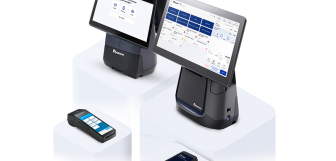
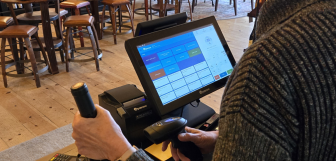
Sales terminals are THE number one piece of hardware a business needs. This device not only processes sales, but is the vessel through which staff conduct all tasks, from stock-checking to selling to clocking-in and -out. Everything runs through the sales terminal, which makes it a central part of your hardware collection.
In 2026, POS providers are building the speed, reliability, and ease of use of their devices. Touchscreen terminals should also be sturdy and resistant to things like fluid spillages. They
A good sales terminal will be different depending on your industry and position in the market. Portability is sometimes handy, especially for retailers that go out on pop-up stalls and markets. Alternatively, tablets offer the option of going mobile while also fitting well into a stand to operate at a fixed checkout.
Meanwhile, sales terminals often have many other pieces of POS hardware built into them, from scanners to printers and often card machines, too! Either way, a good sales terminal should be robust enough for daily retail use, compatible with your POS software, and able to integrate seamlessly with peripherals like scanners, printers, and card machines.
Variants: Fixed countertop terminals, tablets, mobile devices, all-in-one POS and card machines
Estimated cost range: £300–£1,500 per terminal
Key function: Running POS software and managing sales at checkout
Payment processing devices
Payment processing devices (or card machines) take non-cash payments for businesses, from debit cards, credit cards, watches, and digital wallets like ApplePay and GooglePay. In 2026, these forms of payments have become very much the norm, with the speed and security of contactless payments becoming a great way of speeding up checkout.
Card machines come in many forms, from featherweight devices (like the Epos Now Air) which fit in your pocket and don’t weigh you down in the slightest, to larger, fixed and wired devices that stay on your counter, working steadily through the day.
Almost all businesses in 2026 have their card machine integrated with a POS terminal (if it’s not already built in). This allows the business to process the payment through the card machine without touching it. The staff only have to populate the basket on the sales terminal, then select card payment when the customer is ready to pay!
Security is a major consideration when choosing a card machine, with PCI compliance and end-to-end encryption protecting customer payment data, which you should ensure any device you choose comes with.
Setup: Connected via Wi-Fi, Ethernet, or Bluetooth to the sales terminal
Variants: Countertop, portable, and mobile card machines
Estimated cost range: Usually £20–£40 per month or £150–£600 upfront + a percentage of card payments around 1.5 to 3%
Key function: Processing card and digital wallet payments securely
Barcode scanners
When your store is selling hundreds, thousands, or even tens of thousands of products, knowing the name of each one, and loading hotkeys onto your system just isn’t practical (most retailers will only do this for the bestsellers). Instead, barcodes are the industry standard.
If you’re using barcodes, then barcode scanners are every bit as essential as card machines. A good scanner optimises your checkout process, reduces pricing and product selection errors, and lets you scan a basket straight into the POS. They can also help with stock checks as they help you look products up quickly, syncing your shelves with your POS system!
Barcode scanners could be handheld, wireless, could sit on your countertop, or even be built into your sales terminal or self-service kiosk, which offers your business full flexibility in terms of how you want to scan your customers’ baskets. Choosing the right scanner depends on your environment, product range, and checkout volume, but even small and micro retailers benefit from the speed and accuracy they provide.
Setup: Plug-and-play via USB or wireless/BlueTooth connection
Variants: Handheld or countertop/fixed, wired or wireless
Estimated cost range: £50–£300
Key function: Fast and accurate product scanning
Printers
Even if you offer email receipts, many customers prefer the option of a paper receipt after a sale, just as some managers like printer EOD reports. Many businesses need both receipt printers and label/barcode printers, which print off product details for your shelves and let you manually barcode products that don’t already have them built on.
Thermal printers are the most common choice in 2026, as they’re fast, quiet, and don’t require ink cartridges. Outside of a hospitality environment, therml printers should always be clear and effective (just don’t put them next to a radiator!). Printers can be counter-mounted or tucked away under the till to save space, or better yet, built into your sales terminal.
Reliability is key: a faulty printer can quickly slow down the checkout experience during busy periods. So check reviews, test it, and make sure you’re getting everything you need! Oh, and keep the manual!
Setup: Built into a sales terminal, or connected via USB, ethernet, or BlueTooth
Variants: Thermal receipt printers, impact printers, label and barcode printers
Estimated cost range: £80–£400
Key function: Printing receipts and labels
Popular POS accessories
While not essential for every retailer, POS accessories can significantly improve business efficiency, accuracy, and the overall customer experience (as well as making life easier for your team!).
Cash drawers
Cash drawers are used to securely store notes and coins at the point of sale and are still relevant in 2026, particularly for retailers that are accepting cash or operating in high-footfall environments, requiring the security they provide. Cash drawers are designed to open automatically when triggered by a completed sale through the POS system or receipt printer, though you may want to alter your settings to avoid this happening when you make a card sale.
Setup: Wired to a receipt printer or POS terminal
Variants: Manual, electronically triggered, front or top opening
Estimated cost range: £60–£200
Key function: Secure storage
Customer-facing displays
Customer-facing displays show transaction details to shoppers in real time, including scanned items, prices, discounts, and totals. These displays improve transparency at checkout, helping customers feel confident that items are priced correctly and promotions are applied as expected.
But many displays in 2026 are now interactive, and provide more than the basic transaction info. This allows for data collection, emails, for instance, for an email receipt. It also offers branding and advertising opportunities, making the checkout more engaging.
Setup: Mounted or connected to POS terminal
Variants: Pole-mounted screens, integrated displays, tablet-based displays
Estimated cost range: £100–£350
Key function: Displaying transaction details and messaging to customers
Weighing scales
Weighing scales are essential for all retailers selling items by weight, such as grocers, delis, bakeries, and farm shops. When integrated with a POS system, scales automatically send accurate weight and price data directly to the checkout, reducing errors and speeding up transactions.
POS-compatible scales are highly precise. Some models include customer-facing weight displays or barcode printing for pre-packaged items, helping streamline operations in both attended and self-service environments.
Setup: Integrated directly with POS system or scanner
Variants: Countertop scales, integrated scanner-scales, label-printing scales
Estimated cost range: £200–£1,200
Key function: Accurately weighing and pricing products at checkout
Self-service kiosks
Self-service kiosks are becoming more and more visible across the UK, with most supermarkets adopting them. They’re a visible sign of automation in UK retail, and have cut both queues and labour costs cross the country.
Kiosks, essentially, are POS terminals that don’t need your team to process sales. They have improved security, so customers cannot access any of your business data (as they might on a regular POS system), but enable customers to scan their own basket, bag their items, then pay, all without direct staff aid (unless buying restricted products, or if they run into trouble).
While smaller retailers aren’t yet using self-checkout prevalently, self-checkout lanes and hybrid systems are growing. Grand View Research data shows the UK self-service market is already over 2.5 billion USD, and predicted to near 4 billion by 2030. This shows the readiness of retailers to invest in self-service thanks to its long-term affordability, despite the often significant installation costs.
Setup: Installed in-store, connected to network, POS, and payment systems
Variants: Fixed on-floor self-checkout terminals; hybrid staffed/self-service tills; compact kiosks for small baskets
Estimated cost range: Anywhere from £1,500–£10,000+ per kiosk depending on features
Key function: Enable customers to complete their own checkout, reducing queues and staff workload
Factors to consider when choosing your hardware
Now you know what hardware you may want for your business, you’ll need to make sure you choose well. To help you in this, here are a few things to consider when making your decision:
-
The reputation of the provider. Look for hardware suppliers with strong reviews and case studies, both online and from local UK retailers. Speaking directly to other businesses in your industry and your area can also reveal the reliability, support quality, and hidden costs that you may not find online.
-
Integrations. Ensure the hardware you choose integrates seamlessly with any hardware you plan to use, your POS software, and any third-party apps (like loyalty platforms and accounting software). Poor integration can lead to manual workarounds and data silos.
-
Design and user experience. Hardware should be intuitive for your staff to use and present a professional image to customers. Sleek, stylish designs can improve the shopping experience and reflect well on your business.
-
Durability. Retail environments can be tough. Your checkout is busy and accidental knocks could damage fragile hardware. Prioritise durable hardware with good warranties to minimise downtime and replacement costs.
-
Scalability. Choose hardware that can grow with your business. Systems or devices with flexible configurations, where you can add extra devices in, help you avoid complications as you add new locations or services.
-
Support and warranty. Reliable technical support and robust warranty coverage are essential, especially for critical devices like terminals and card payment hardware.
-
Cost. Look beyond upfront prices to consider ongoing costs. Subscriptions, peripheral add-ons, and replacement parts are all part of your total investment.
-
Security features. All your devices should support up-to-date security standards (such as PCI compliance and data encryption on card machines, but also secure locking on cash drawers, and account security on your sales terminal). Strong security protects all the data your business handles.
Epos Now: Find the hardware you need the easy way
If you’re looking to find hardware that meets all the above criteria and fits together with everything you need for your business, why not try the Epos Now Bundle Builder?
The Bundle Builder lets you find the hardware you need and piece it together to create the perfect solution for your business. Whether you need:
Or any POS hardware, Epos Now’s retail solution can come together to ensure your business has everything it needs in 2026 and in the years to come!