What Is a Tip Screen? A Guide to Boosting Revenue with Customer-Facing Displays
Forbes reported in 2023 that Americans tip 15% more on average when they only have to tap a button on a screen rather than pulling the cash out of their wallet, and 64% of people Forbes surveyed tip over 10% more if tipping digitally. So digital tipping, rather than a tip jar, has clearly become the way to go for businesses that want their employees to get that extra reward for great service.
That’s why, today, we’re giving you the full scoop on tip screens. We’ll cover:
-
What is a tipping screen?
-
Where can you put a tip screen?
-
How do tip screens influence behaviour?
-
How to setup a tip screen?
-
Pros and cons of tipping screen
By the time we’re finished here, you’ll know all you need about tipping screens, how to use them, and whether you want one for your business. Let’s get into it!
What is a tipping screen?
Tipping screens or tip screens (sometimes, you may hear them called gratuity screens, too) are digital interfaces which ask customers whether they want to add a tip to their sale during checkout. Tip screens have largely replaced tip jars and have been a successful adaptation to the sales process in an era where card payments are more common than cash.
The tip screen first emerged in the 2010s, and by the end of that decade had become a popular way of managing tips. Throughout the 2020s they’ve exploded in popularity. The COVID-19 pandemic and the reduction in cash sales combined with developments in technology such as QR menus and touchscreen POS systems has seen even small businesses using more and more complex POS technology. As this technology became more complex, the tipping screen became such common part of the checkout process that consumers are no longer surprised to see it. They’re everywhere! In coffee shops, quick-service restaurants, bars, and even on the markets and in parts of the retail sector.
How do tip screens work?
When a server enters an order on a POS (point of sale) system, and starts taking the customer through the checkout process, the tipping screen comes into play. This could be on a customer-facing display screen on the back of the till, or on the card payment processor itself.
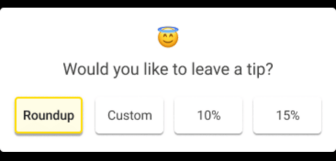
Usually, this will show the current sale price, a number of suggested tip options (e.g 5%, 10%, or 20%) and the amount that tip would be, the option to not tip, or a custom tip option. The customer makes a selection and that tip (or no tip depending on their choice) is then added to the sale. The POS then continues through the checkout process and the customer completes the payment with their card.
Tipping screens are fully synced with POS systems, which means the POS can also record the tip amount connected to the transaction (and the staff member that processed it) and adjust the financial reports and tip reports to make tip processing super easy for everybody involved! The POS tracks tips for every employee for each shift, day, and month, so business owners have no maths to do and everyone gets treated fairly.
In short, a tipping screen is a simple but powerful tool: it streamlines checkout, increases tipping opportunities, and integrates seamlessly with the digital systems businesses already use.
Where can you put a tip screen?
Tipping screens are extremely flexible. You can put them on any device you already use to process payments. Devices you might see a tip screen on include:
-
POS terminals with a customer-facing display. These fixed checkout points are common in all kinds of businesses in both the retail and hospitality sectors, from cafes to convenience stores, restaurants, salons and barbers, and hotels–anywhere a customer approaches a counter to checkout.
-
Tablets. Many businesses use tablets for point of sale systems, and tipping screens can be built into them. Tablets can be mobile or fixed at different moments, and some even have payment processing capabilities, which means tipping screens can be part of a compact but flexible all-in-one POS system.
-
Card machines. Some card machines are small devices with screens that don’t fit a tipping screen. However, many others have touchscreens that ask about tips before every sale!
-
Mobile POS systems. Mobile POS systems like the Epos Now Pro+ offer portability, essential for businesses like food trucks, but that doesn’t mean they have less functionality. These handheld devices combine POS with payment processing and can easily incorporate a tipping screen.
Businesses can get a tipping screen to anywhere they process a payment, and these days they can process payments anywhere! This includes shop and dining floors, bars and counters, even the middle of a field where a market or food truck is stationed!
How do tip screens influence your behaviour?
Put simply, tip screens make tipping easier. However, to reduce them to conveniences is to ignore the ways they influence customer behavior, because a tip screen changes how much people tip and how often they do it.
Digital checkouts with preset tip percentages remove the barriers and difficulty involved in making a tip. Customers can just press a button without thinking about it and move on, even though they just made their visit to your business as much as 20% more expensive. Many tipping screens also set a default option (say 5 or 10%), which lets customers tip a “standard amount”. Thanks to these factors and several others, businesses that switch to a digital tipping screen see a 26% increase in tipping volume. That’s 26% worth of benefits to your staff, which is sure to keep them happy and see the smiles spread all around your sales floor!
However, it’s not all sunshine and rainbows. The decision to implement a tip screen has been known to influence customers negatively, too. Not all customers respond positively to the subtle social pressure of being presented (repeatedly) with the prompt to tip. The phenomenon of “tip fatigue” occurs when consumers become tired and frustrated with consistent requests to tip staff when they enter businesses.
A 2023 Capterra survey of US consumers discovered that 50% of people feel manipulated or tricked into leaving tips when using checkout tablets. 82% of those respondents have encountered them in places like quick-service restaurants where many consumers admit to being surprised or confused when asked to tips. This often occurs in retail environments, too, where tipping is not as customary.
So while many people are tipping more often when presented with screens, consumers can become frustrated when it is a default request in a business, which makes the decision to implement a tipping screen more complex than it might seem.
Naturally, business owners want to increase gratuities for their hard-working staff, and tipping screens are near-guaranteed to do so thanks to the simplicity of tipping and design psychology which increases the amount customers tip. But the risk is the alienation of customers, a potential negative effect on the brand, and a loss of goodwill that could combine to see some customers not come back to the business.
Overall, tip screens are powerful tools for influencing behavior: they can drive up tip amounts and frequency. But if used indiscriminately, or without sensitivity to customer comfort, they can also fuel tip fatigue, frustration, and resentment.
How to setup a tip screen
Setting up a tip screen isn’t that complicated, especially if you already have a POS system. Most POS providers like Epos Now already have tipping features, so if your business is already set up, you may simply need to take a look in your settings and enable the tipping feature. You should then be able to choose what percentage options you wish to appear, and set a default amount and custom tip option.
A customer-facing display should then display when your wish to make a sale, but it’s a good idea to check it’s appearing. Meanwhile, on tablet devices, you’ll need to establish a process for turning your tablet to the customer so they can use the tip screen without accessing your POS. You can purchase tablet stands with 360-degree rotation to help you do this, if required!
Some card machines and payment processors will have a dashboard where tipping can be enabled and modified. Once activated, your card terminal should display tip options before requesting the customer taps or inserts their card.
However you plan to do it, after you enable tipping, it’s always a good idea to see how this affects the flow of your sale and make any adjustments to ensure it still feels natural and easy. With just a few settings adjusted, your business can begin collecting digital tips smoothly and consistently.
Tipping screens: pros and cons
If you’re wondering whether or not to implement a tipping screen in your business, consider this pros and cons list to decide if it’s right for you.
Pros of tipping screens
-
Increases tipping frequency and amount: Preset percentages and simple tap-to-tip options make customers more likely to leave a gratuity.
-
Speeds up checkout: Digital prompts remove the need for cash handling, tip jars, or writing on receipts. It’s also automated, so tipping is a smooth part of the sales process.
-
Improves staff earnings: Higher and more consistent tip amounts help employees feel valued and fairly compensated.
-
Integrates with POS reporting: Tips are automatically tracked, assigned to staff, and included in end-of-day reports.
-
Works on multiple devices: Tip screens can run on POS terminals, tablets, or portable card machines, making them highly flexible.
-
Reduces awkward conversations: Staff don’t have to ask for tips directly, as the screen handles the prompt.
Cons of tipping screens
-
Can cause tip fatigue: Frequent or unexpected tip prompts may irritate customers.
-
Sometimes feels intrusive: Customers can feel pressured to tip when a staff member is watching them select an amount.
-
Could harm brand perception: If customers feel manipulated, they might develop negative feelings toward the business.
-
Doesn’t guarantee improved service: Higher tips may result from interface design rather than service quality, which can undermine trust.
Tip screens: a blessing in the right context. A hidden problem in others?
Tipping screens have become a familiar part of the checkout. Used well, they make life easier for staff and customers alike, but that requires careful consideration and refinement of tip settings and sales processes. Nevertheless, they can streamline payments and significantly increase the gratuities your staff receive.
Plus, tip screens integrate smoothly with payment processors and POS systems like Epos Now, which generate tipping reports automatically so managers and business owners can have an easier time staying on top of tips.
Like this blog? Take a look at Epos Now’s other resources to learn more about POS systems and business management across the retail and hospitality industries.